
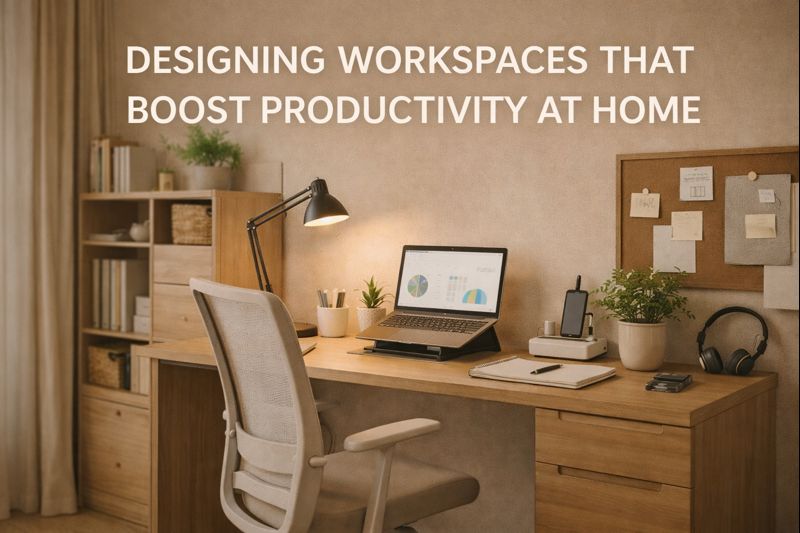
Remote work and home-based businesses are no longer temporary trends they are now part of everyday life. As more people work, study, and run businesses from home, the importance of a well-designed home workspace has never been greater.
A thoughtfully designed home office does more than look good. It improves focus, supports healthy posture, minimizes distractions, and increases overall productivity. Whether you have a dedicated room or a small corner in your living space, smart design choices can transform your work experience.
This guide explores how to design a home workspace that truly boosts productivity, comfort, and long-term efficiency.
Why Home Workspace Design Matters
Many people underestimate how much their physical environment affects their mental performance. A cluttered, uncomfortable, or poorly lit workspace can cause:
Frequent distractions
Fatigue and back pain
Reduced motivation
Poor concentration
Burnout
On the other hand, a properly designed workspace promotes:
Better time management
Increased creativity
Improved organization
Professional mindset
Long-term health
Your workspace should support your goals, not hinder them.
1. Choose the Right Location
The foundation of a productive home workspace starts with location.
What to Consider:
Low noise levels
Good natural lighting
Minimal foot traffic
Privacy for meetings
If possible, use a spare room. If not, create a dedicated corner in your bedroom or living room using partitions, shelves, or screens to separate work from personal life.
2. Invest in Ergonomic Furniture
Comfort directly affects productivity.
Essential Furniture:
Adjustable chair with lumbar support
Desk at proper height
Footrest (optional but helpful)
Poor posture leads to back pain, neck strain, and fatigue—all productivity killers. Ergonomic furniture ensures you can work comfortably for long hours without physical stress.
3. Optimize Natural and Artificial Lighting
Lighting plays a critical role in focus and energy levels.
Best Practices:
Place desk near a window
Avoid glare on screens
Use warm ambient lighting
Add a focused desk lamp
Natural light improves mood, reduces eye strain, and increases alertness.
4. Use Space-Saving Storage Solutions
Clutter equals distraction.
Smart Storage Ideas:
Built-in shelves
Floating cabinets
Drawer organizers
Vertical storage units
Everything should have a designated place to maintain a clean and professional environment.
5. Choose Productivity-Friendly Colors
Colors influence emotions and concentration.
Recommended Colors:
Soft blue – calm and focus
Light green – balance and creativity
Neutral tones – professionalism
Warm accents – motivation
Avoid overly dark or loud colors that cause visual fatigue.
6. Integrate Smart Technology
Modern workspaces benefit from smart tools.
Useful Additions:
Cable management systems
Wireless chargers
Smart lighting
Noise-canceling headphones
Dual monitors
Technology should simplify your workflow, not complicate it.
7. Control Noise and Distractions
Noise is one of the biggest productivity challenges at home.
Solutions:
Thick curtains
Rugs or carpets
Acoustic panels
White noise machines
Noise-canceling headphones
Sound control is essential for concentration and professional video calls.
8. Create Clear Work-Life Boundaries
Your brain needs visual cues to switch into “work mode.”
Tips:
Use a specific desk only for work
Avoid working from bed
Keep work tools separate from personal items
Set working hours
This mental separation prevents burnout and improves focus.
9. Add Personal Touches (But Keep It Minimal)
A workspace should feel motivating, not sterile.
Ideas:
Indoor plants
Framed artwork
Vision board
Subtle décor
Motivational quotes
Avoid overcrowding your desk with unnecessary items.
10. Improve Air Quality and Comfort
Fresh air boosts brain performance.
How to Improve:
Open windows regularly
Add indoor plants
Use air purifiers
Maintain comfortable room temperature
A healthy environment equals a productive mind.
11. Design for Flexibility
Your needs may change.
Consider:
Adjustable desks
Modular shelves
Mobile storage units
Flexible design saves money in the long run and adapts to new work styles.
12. Small Space Workspace Ideas
Even small homes can support productive workspaces.
Options:
Wall-mounted desks
Foldable desks
Wardrobe-office combinations
Under-stair workstations
Floating shelves
Space limitations should never limit productivity.
13. Storage & Cable Organization
Messy cables ruin both productivity and aesthetics.
Use:
Cable trays
Wire sleeves
Desk grommets
Cable boxes
A clean desk improves mental clarity.
14. Security and Privacy Considerations
For business owners and remote workers:
Lockable drawers
Password-protected devices
Screen privacy filters
Soundproofing for calls
Professionalism starts at home.
15. Benefits of Professional Workspace Design
Hiring interior designers ensures:
Optimal space planning
Ergonomic layouts
Smart storage solutions
Modern aesthetics
Increased property value
Professionals balance beauty with function.
Common Mistakes to Avoid
Working from bed
Poor lighting
Cheap chairs
Overcrowding the desk
Ignoring storage
No separation from living areas
Cost vs Value
While designing a workspace requires investment, the returns are significant:
Higher productivity
Reduced health costs
Better work quality
Improved mental well-being
Increased income potential
It pays for itself over time.
Final Thoughts
A productive home workspace is not a luxury—it’s a necessity in today’s world. With the right layout, furniture, lighting, and organization, your home office can become a powerful environment that supports success, creativity, and well-being.
Whether you work remotely, run a business, or study from home, investing in workspace design is investing in your future.
